
Disclaimer: Cybrary is not an official training partner of any certifying body. However, Cybrary courses can be used to fulfill the CEU/CPE requirements of many certifying bodies.
Earn CEUs + CPEs through Cybrary Courses and Labs
On each Cybrary Course and Lab page within the Cybrary catalog, the available CEU/CPE credits are listed underneath the item’s short description, next to the difficulty level (see Image 1). Once you complete 100% of the content within that item, you will be eligible to receive a Certificate of Completion. The Certificate of Completion can be submitted directly to a certifying body for CEU/CPE credit.
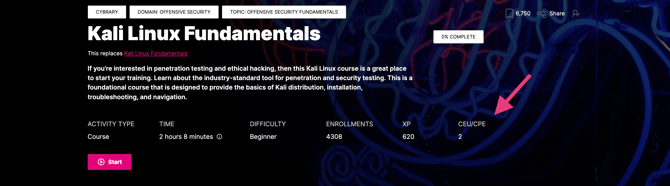
Image 1
Please Note: Learners are responsible for verifying with their certifying body how many CEUs/CPEs are necessary to support their continuing education goals (this varies by certification), and for verifying with the certifying body that their Cybrary CEUs/CPEs have been accepted
CEU/CPE Policies for popular certifying bodies
-
CompTIA
-
See: Training and Education Training and Higher Education
-
Cybrary’s Pre-approved Courses: Earn Your CompTIA Continuing Education Units (CEU) - Cybrary
-
-
ISC2
-
ISACA
-
See: Self Study Courses How to Earn CPE | Continuing Professional Education
-
Some certifying bodies do not use CEUs
-
AWS requires learners to re-certify in order to maintain their certification AWS Recertification
-
Microsoft also requires recertification Renew your Microsoft Certification - FAQ
How do I calculate CEUs/CPEs?
One learning hour equates to one CEU/CPE.
Is everything I do in Cybrary eligible for a Certificate of Completion?
No. Only Cybrary courses and virtual labs are eligible for Certificates of Completion. Learners cannot earn a Certificate of Completion (or CEUs/CPEs) for content from vendor partners, including labs, assessments, and practice tests.
To quickly determine if there is a Certificate of Completion available for an activity, go to its page in the catalog, and scroll down. If the activity is eligible for a Certificate of Completion, the icon will appear on the right side panel of the screen (see Image 2)

Image 2 - Cybrary Lab, eligible for CEUs/CPEs
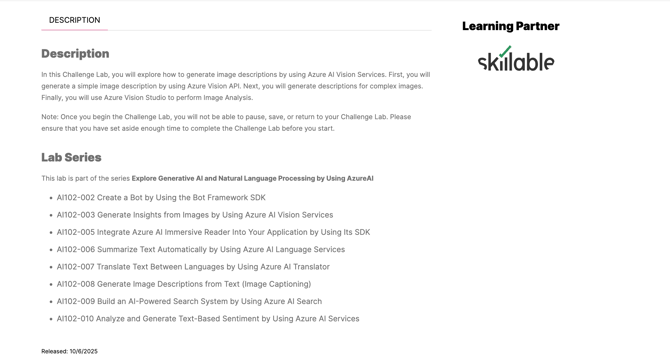
Image 3 - Vendor lab. Not eligible for CEUs/CPEs
Accessing Certificates of Completion
To access your Certificates of Completion, follow the steps below (see Image 4):
-
Go to "Profile" from the Account icon
-
Click the Certificate of Completion tab
-
Courses that have been 100% completed will populate with a "Download Certificate" icon
-
Click the icon and your Certificate of Completion will be available to download in a new tab
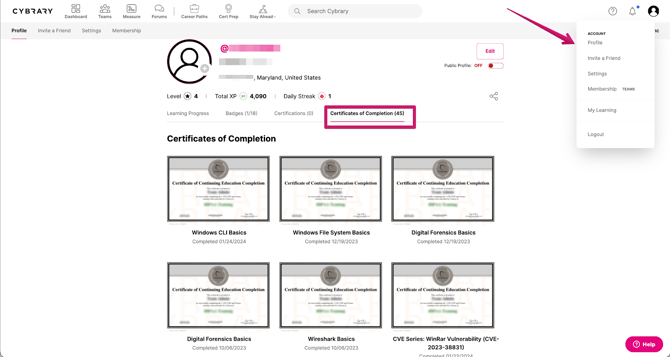
Image 4
When will I receive my Certificate of Completion?
Allow up to 24 hours from the time you completed an activity for progress to be updated. Cybrary integrates content from various vendor partners to provide our learners with a variety of hands-on experiences, from virtual labs to multiple types of assessments.
To ensure you do not encounter any hiccups with the recertification process, plan to complete your CEU/CPE activities at least one week (7 business days) before your recertification deadline. This will allot sufficient time for your Certificates of Completion to populate, and to leave time for troubleshooting and triaging purposes.